

FAQs
Frequently Asked Questions (FAQs)
Q
I found an interesting book- how do I pay for it?
A
Found something that you want to read further? All you need to do is:
- to first create an account with eSentral.
- After creating an account, you need to login into your account.
- Click on the book that you want to purchase, select buy.
- After selecting buy, your book will be added to the basket.
- Click Checkout and then Click Payment.
- You will be directed to the payment gateway. Select the method of payment there.
Q
How do I create an eSentral account?
A
Create an eSentral account by clicking Click here to register. Fill in all the required fields. Then click register.
Q
I already have an account with eSentral and have already bought a book- how do I read this book?
A
So you have purchased your e-book. In order to read this book, all you need to do is:
- Download the eSentral app on Apple appstore
- After downloading, sign into the eSentral e-reader using your username and password.
- Then, you will enter your virtual library.
- Click on the Account tab at the bottom of the eSentral e-reader. All your purchased books will be displayed here.
- Download your book.
- Click on the Library tab at the bottom of the eSentral e-reader to go to your virtual library.
- Click on the book that you want to read and start reading.
Q
Deactivation: Sometimes I can't download or read the books that I have bought. What can be done if that's the case?
A
So you have purchased your e-book but can't seem to be able to download or read it. In order to rectify this, you will need to deactivate your device.
*Your books will still be available to be downloaded again after deactivationAll you need to do is:
Android Users
- After logging in to your E-Sentral Apps, go to the top-right corner and find the 'Profile' link
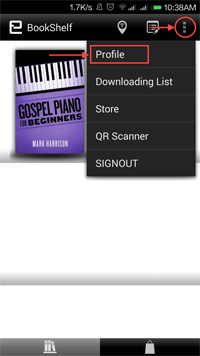
- This will pops up Profile Information where you can deactivate your device. Tap on the 'Deactivate' button to deactivate.
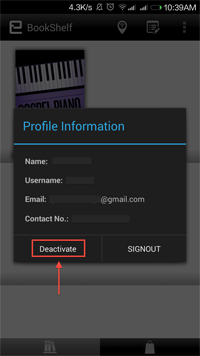
- You'll be directed to the login screen again. You will then need to log in and try to re-download the ebook you wanted to read.
iOS Users
- After logging in to your E-Sentral Apps, go to the top-right corner and find the 'Profile' icon
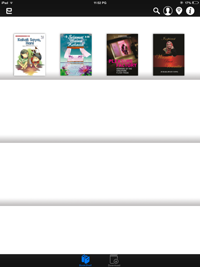
- This will pops up Account Info where you can deactivate your device. Tap on the 'Deactivate' button to deactivate.
-
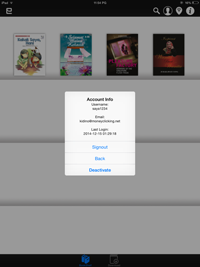
- You'll be directed to the login screen again. You will then need to log in and try to re-download the ebook you wanted to read.
Q
I can't remember my password. How do I assess eSentral?
A
Just click on forgot password and then provide your e-mail address or login ID.
A new password will be sent to your e-mail.
After signing in using your new password, change your password and you can assess the portal as usual.
Q
How do I find what I am looking for at eSentral bookstore?
A
There are several ways to find what you are looking for at the bookstore:
- Search by shelf e.g. Latest, Bestseller, Reader's Choice, Recommended.
- Search by genre in the Categories' tab
- Serach by title/ author at the search box at the bottom of the page
Q
How do I contact eSentral
A
There are several ways that you can contact us.
- Call us at our support line at 03-80516390
- Drop us an e-mail at info@e-sentral.com
- Leave a comment on our facebook.