

Guide
GUIDE

FIND
There are three (3) ways to browse for ebooks in eSentral Portal:
- From eSentral Home Page
- Search by Categories
- Using Search Box
- From the Home Page
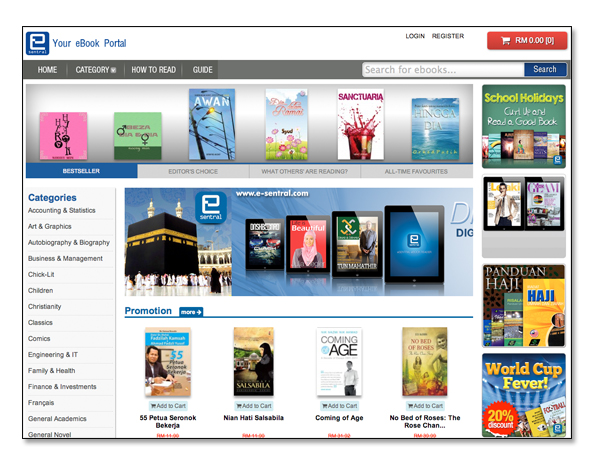
The eBooks displayed on the home page are subjected to change periodically. Nevertheless, you can always browse through these categories:
- Bestseller : Bestseller titles currently at eSentral
- Editor's choice : eSentral's editor's choice
- What Other's Are Reading : An insight on what other people are reading at the portal
- All-time Favourites : All-time favourite titles at eSentral
- Promotions: ebooks that are on special price cut.
- Pick of the Week: Weekly selected titles.
- New Releases: Recently added titles in eSentral.
- Fiction Novel: Selected Fiction reads
- Comics: Selected comics ebooks
- Motivation: Selected motivation reads
- From the Categories
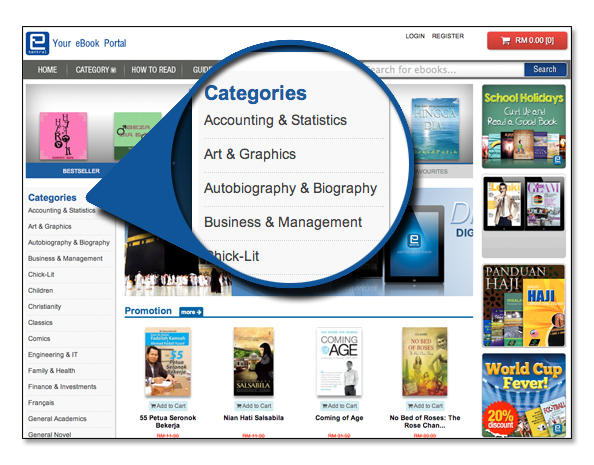
You can also browse the ebooks by categories through the list found on the home page located on the left hand of the screen as well as on the navigation bar at the top of the home page.
- Using the Search Box
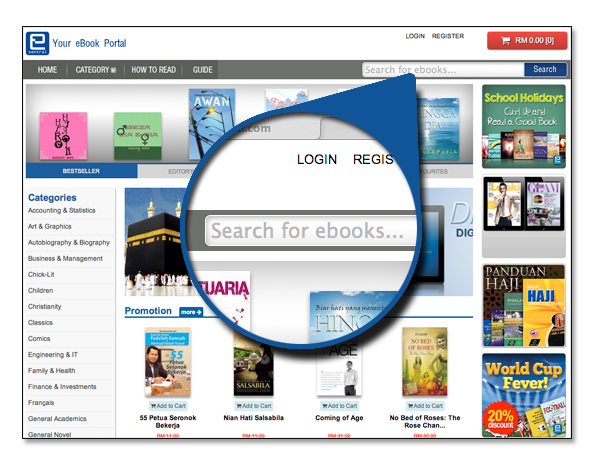
Ebooks are also browsable using the search field located on the navigation bar located at the top of the home page. You can either enter a specific title of the ebook, eISBN, author (e.g. Gilgamesh a Screenplay, 9781483510132, James Lee) to focus your search or simply enter the related tags into the search box to browse more than one ebook titles (e.g. Love, Friendship, Ahadiat) under the same category.